GOUP Documentation
GOUP is a community platform for builders, founders, operators, mentors, and open source contributors. It brings groups, events, member directories, jobs, landscape discovery, sponsorship, and operational tooling into one product.
These docs are for people using GOUP, leading groups, managing alliances, sponsoring the community, or contributing to the codebase.
Start Here
| Goal | Best Starting Point |
|---|---|
| Get productive quickly | Quickstart |
| Choose the right dashboard | Choose Your Dashboard |
| Discover groups, events, and opportunities | Public Site Guide |
| Participate as a member | Group Members Runbook |
| Lead a group | Group Leads Runbook |
| Run alliance operations | Alliance Dashboard Guide |
| Add or manage multiple alliances | Alliance Dashboard: Multiple Alliances |
| Manage a group dashboard | Group Dashboard Guide |
| Run event operations | Event Operations |
| Contribute projects or code | Project Contributors Runbook |
| Work on the application | Development Guide |
Product Areas
Public Site
The public site is where people learn what GOUP is, discover groups and events, browse the landscape, read docs, view platform stats, find jobs, and learn about sponsorship.
Important pages:
- Explore for groups and events.
- Opportunities for grants, funding, partnerships, research, jobs, and open calls for speakers.
- Jobs for the dedicated role workflow.
- Landscape for startups, GitHub projects, partner communities, and podcast leads.
- Stats for platform activity and engagement.
- Sponsor for partnership inquiries.
Member Experience
Members can manage their profile, join groups, RSVP to events, submit talks, respond to invitations, save job interest, and publish mentorship availability for individuals or businesses.
Member-facing areas:
- User Dashboard
- Profile settings
- Alliance member directories
- Public profile cards at
/profiles/{username}
Group Operations
Group leads use GOUP to manage events, members, sponsors, store items, member spotlights, team permissions, and group-level communications.
Group dashboards include:
- Events and event series.
- Members and team access.
- Sponsors, store, and spotlights.
- Analytics and audit logs.
Alliance Operations
Alliance admins manage brand identity, groups, taxonomy, regions, team access, landscape entries, analytics, and public brand assets.
Alliance-level features include:
- Shared region and category taxonomy.
- Cross-group member directory.
- Public brand page.
- Platform-admin alliance creation for multi-alliance operations.
- Landscape management.
- Alliance and group role permissions.
Opportunities, Mentorship, and Sponsorship
GOUP supports practical community opportunities:
- Members can post public or member-only jobs.
- Members can create native opportunity listings and save daily or weekly opportunity searches.
- Published jobs and open CFS windows are projected into the unified board without duplicating their source workflows.
- Applicants can save interest so posters can follow up.
- Members can offer individual or business mentorship from their profile.
- Mentorship requests are tracked and emailed to mentors.
- Sponsors can submit inquiries after logging in.
Architecture
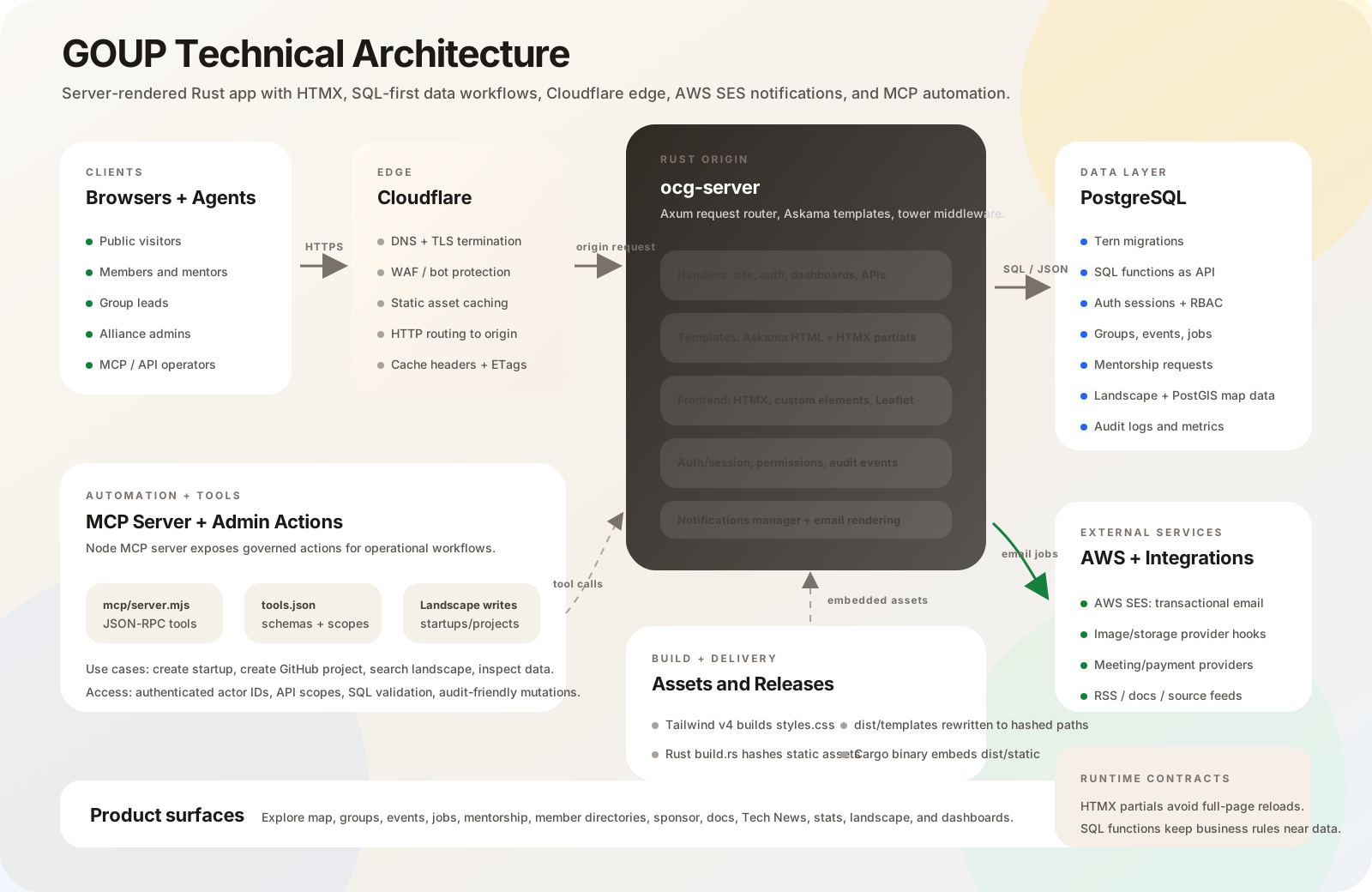
GOUP is a server-rendered Rust application with progressive enhancement. The web app owns the public site, dashboards, member workflows, and background notifications, while PostgreSQL stores product data and exposes most business workflows through SQL functions.
Technology Stack
| Layer | Technology |
|---|---|
| HTTP server | Rust, Axum, Tower middleware |
| Templates | Askama HTML templates |
| Interactivity | HTMX, custom elements, small JavaScript modules |
| Styling | Tailwind CSS utilities and project CSS |
| Database | PostgreSQL with PostGIS |
| Migrations | Tern plus SQL schema/function files |
| Auth | Email/password, GitHub OAuth2, LinkedIn OIDC |
| Background work | Rust services for notifications, email, meetings, payments |
| Testing | Rust tests, pgTAP, Playwright, frontend unit tests |
| Operations | EC2/systemd deployment, optional MCP server |
Run Locally
Use the repository root for most commands.
1. Install Tools
Recommended local tools:
- Rust through
rustup. - PostgreSQL 15 or newer with PostGIS.
ternfor migrations.justfor development commands.- Node.js and npm for frontend and e2e tests.
- Tailwind CSS standalone CLI.
On macOS with Homebrew:
brew install rustup postgresql@17 postgis just go node watchexec
rustup-init
go install github.com/jackc/tern/v2@v2.3.2
Install the Tailwind standalone binary for your platform and make sure tailwindcss is on PATH.
2. Create Local Config
The justfile defaults to $HOME/.config/ocg.
mkdir -p "$HOME/.config/ocg"
Create $HOME/.config/ocg/tern.conf:
[database]
host = 127.0.0.1
port = 5432
database = ocg
user = postgres
password =
Create $HOME/.config/ocg/server.yml with matching database settings. Use
Development Guide for the fuller configuration shape.
3. Create and Migrate the Database
just db-create
just db-migrate
For a clean rebuild:
just db-recreate
4. Run the App
just server
Then open:
http://localhost:9000
For automatic reloads while developing:
just server-watch
Contributor Checks
Use focused checks while developing, then broader checks before opening a PR.
cargo check -p ocg-server
cargo clippy -p ocg-server --all-targets --all-features -- --deny warnings
uvx --python 3.12 djlint==1.39.2 --check --configuration ocg-server/templates/.djlintrc ocg-server/templates
node --check tests/e2e/site/common/header.spec.js
Database and full test commands:
just db-tests
just db-contract-tests
just server-tests
just frontend-unit-tests
just e2e-tests
Deployment Notes
Production is currently a pull, migrate, release-build, restart flow on EC2:
cd ~/goup.vc
git pull origin main
cd database/migrations
TERN_CONF="$HOME/.config/ocg/tern.conf" ./migrate.sh
cd ~/goup.vc
nohup env CARGO_BUILD_JOBS=1 cargo build --release -p ocg-server > ~/goup-build.log 2>&1 &
tail -f ~/goup-build.log
sudo systemctl restart ocg-server
sudo systemctl status ocg-server --no-pager
curl -I http://127.0.0.1:9000
Release builds can take a while on small EC2 instances. A clean optimized Rust build near 15-20 minutes is not unusual when dependencies are not cached.
Need Help?
Start with: